
Help
How to confirm a score, or send it back
In short
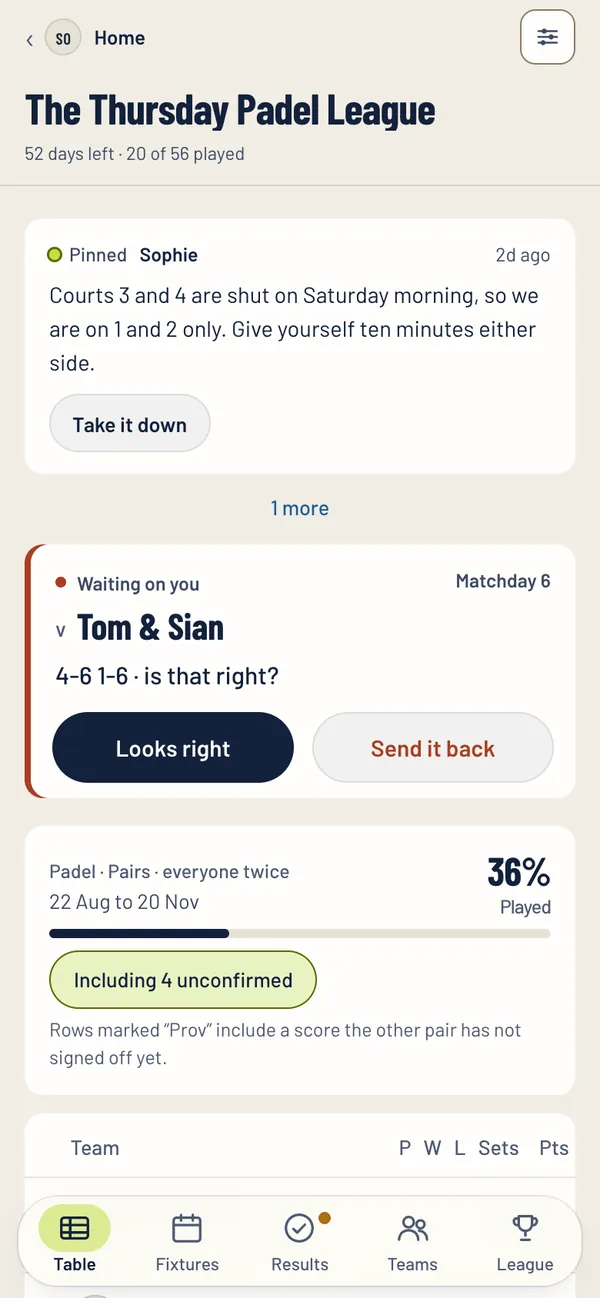
When the other pair put a score in, you get a notification and the match shows Waiting on you. Tap Looks right to confirm it, and the table moves. If it is wrong, tap Send it back: the score is wiped and either pair can enter it again. If you still cannot agree, whoever runs the league settles it.
Confirm a score
- Open the notification, or find the match on Home or in the league. It shows Waiting on you and the score.
- Check the sets.
- Tap Looks right. The table moves straight away.
The score is wrong
You have two choices.
- Send it back. Tap Send it back, then Send it back again to confirm. The score is wiped and whoever played can enter it again.
- Correct it. Open the match, go to the Score tab, fix the sets and tap Save my correction instead. The other pair are then asked to confirm your version.
If you still cannot agree
Whoever runs the league settles it. In a friends league that is the league admin in the app. In a club league it is the club staff, who can confirm a score, send it back, or put the score in themselves from the club console.
Until a score is confirmed, the table counts it with a Prov mark, so everybody can see it is not agreed yet.
Still stuck?
Email hello@padeliga.co.uk with the league name and what you were trying to do. A person will reply. For anything about one league, whoever runs it can often help fastest.
Questions
What does Send it back do?
It wipes the score from the match, and either pair can enter it again.
What if the other pair never confirm my score?
It shows as Prov in the table until they do. Whoever runs the league can confirm it for them.
Can a score be changed after it is confirmed?
Yes. Either pair can change it until the match deadline. After that only whoever runs the league can.