
Help
How to agree a match time
In short
Every match has a date it has to be played by. If you sorted a time on WhatsApp, tap Add the agreed time and save it: nobody has to accept it. Or suggest a time in the app and the other pair tap That works. Then book the court the way you always do. Padeliga does not book courts.
You already agreed a time
- On your match card, on Home or at the top of the league, tap Set a time. Or tap the match on the Fixtures tab and use the Time tab.
- Tap Add the agreed time if it asks, then pick the day and the time.
- Tap Save the time. Everyone else in the match gets a notification. Nobody has to accept it.
- Want the group to know? Tap Tell the group and WhatsApp opens with the message written. You pick the chat.
Suggest a time in the app
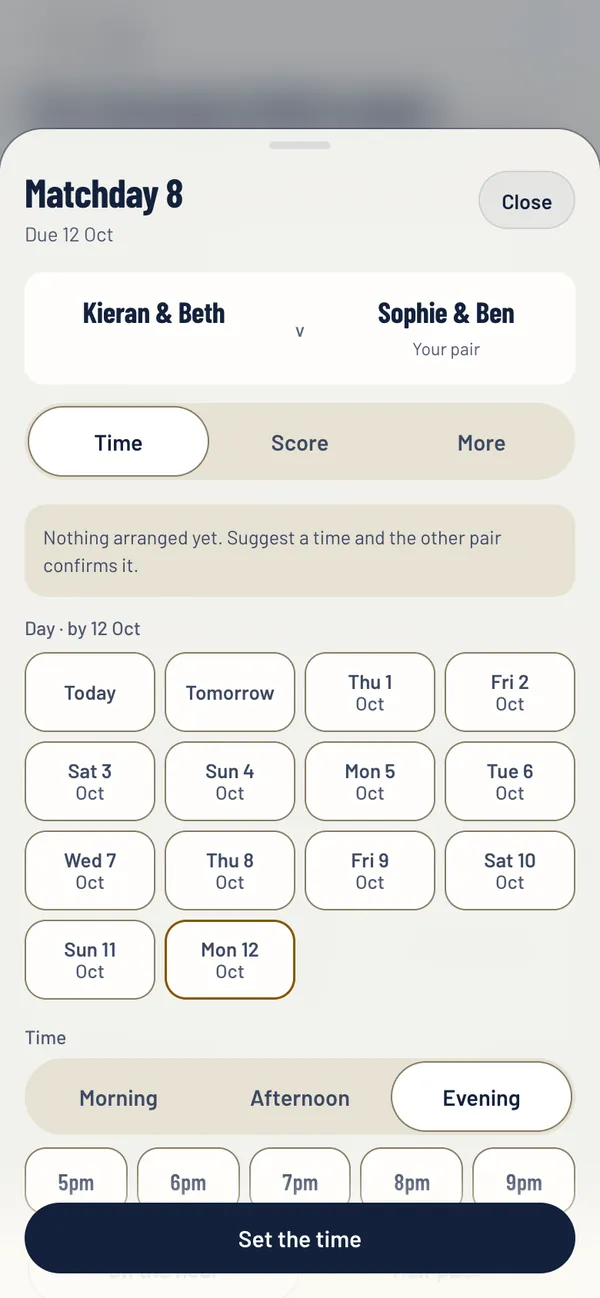
- Open the match: tap Set a time on your match card, or tap the match on the Fixtures tab. Under Or suggest times in the app, the days are already there.
- Pick a day. Only days up to the match deadline are offered.
- Pick Morning, Afternoon or Evening, then the hour, and On the hour or Half past.
- Add Where if you like, for example Court 3.
- Tap Suggest this time. The other pair get a notification.
When the other pair suggest a time
You get a notification, your match card shows Answer the time, and the app asks Can you make it? when you open it.
- That works agrees it.
- Cannot make it sends it back so they can suggest another.
- Suggest another time offers yours instead.
Book the court
Book it the way you always do, at your club or on your usual booking app. Padeliga records when and where you are playing. It does not book courts or take payments.
Need to reach the other players? Tap the round WhatsApp button on your match card to make a group for the match: copy a group name and the numbers, then paste the group’s invite link back in, and the other three get Join the match chat. If your league has phone numbers, the match also shows a WhatsApp button for each player under Get hold of them, with a message already written.
Change or clear a time
Open the match and tap Change the time. To take the time off altogether, open the More tab on the match and tap Clear the time.
Still stuck?
Email hello@padeliga.co.uk with the league name and what you were trying to do. A person will reply. For anything about one league, whoever runs it can often help fastest.
Questions
Does Padeliga book the court?
No. You book the court the way you always do. Padeliga records the time and the place so everyone in the match has it.
Does the other pair have to accept a time I add?
Not if you use Add the agreed time: it is for a time you have already agreed, and the others are just told. A time you suggest in the app waits for them to tap That works.
What if we cannot play before the deadline?
Ask for more time from the match itself. See asking for more time.