
Help
How to join a padel league in Padeliga
In short
Every league has its own join code. Scan the QR code on the poster, tap the invite link you were sent, or type the code in the app. Then type your name, make up a PIN and tap Join the league. There is no email address and no password, and players never pay.
Three ways in
- Scan the QR code on the poster at your club. Your camera opens the right league.
- Tap the invite link that whoever runs the league sent you, by email or in a group chat.
- Type the code in the app. Codes look like ABC123.
On an iPhone, a scanned code or a link opens the Padeliga app if you have it, or offers the App Store if you do not. On Android it opens in your browser and offers to install Padeliga. See how to install the app.
Join by typing the code
- Open Padeliga. If you are already in a league, go to Home and tap Join or start another league.
- Type the code in the Join code box and tap Continue.
- Make sure I am new is selected.
- Type Your name, the way people know you. Some leagues ask for a full name.
- Make up a PIN of 4 digits or more. Easy ones like 1234, 1111 or a year are refused.
- Add a Phone number if you want to. Some leagues ask everyone for one. Only players in the league can see it.
- In a league of fixed pairs, choose Who are you playing with? They get asked to accept. You can also pick I will sort it out later.
- Leave Turn on notifications ticked if you want to hear about your own matches.
- Tap Join the league.
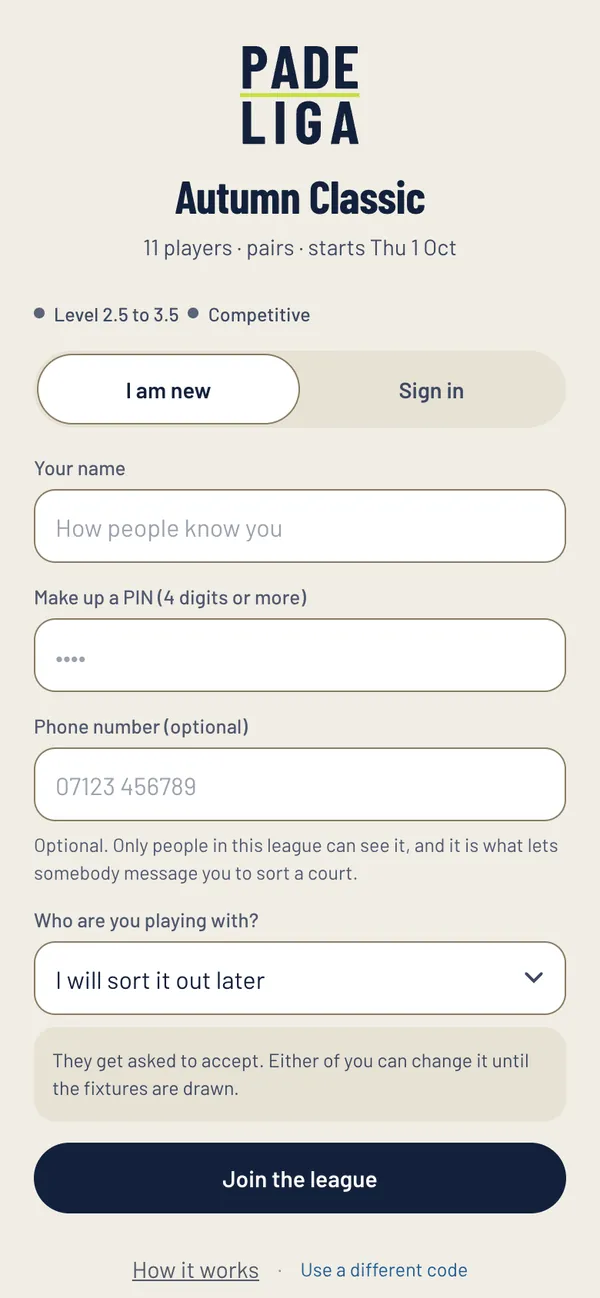
After you join
The league shows on your Home screen. Before the start date you will see who else is in. When the fixtures are drawn you are told who you play first and the date it has to be played by. If the league has already started, whoever runs it will fit you in.
Keep your PIN somewhere safe. You need it, with the join code and your name, to sign in on another phone.
If the code does not work
- The app says No league with that code: check it against the poster or the invite, letter by letter. A zero and a letter O are easy to mix up.
- The code is a club code, not a league code: tap follow a club under the box instead, and you see every league the club has put up.
- Still nothing: ask whoever runs the league for the code again.
Still stuck?
Email hello@padeliga.co.uk with the league name and what you were trying to do. A person will reply. For anything about one league, whoever runs it can often help fastest.
Questions
Do I need an email address or a password to join?
No. You join with the league code, a name and a PIN.
Does it cost anything to join a league?
No. Players never pay Padeliga. If a club charges an entry fee, you pay the club directly, by the method it gives in the app.
Can I be in more than one league?
Yes. Every league you are in sits on your Home screen. Each league has its own PIN, and the app offers the last one you used.
I do not have a partner. Can I still join?
In a league of fixed pairs, join and choose I will sort it out later, or ask whoever runs the league. In a social league, the app draws you a new partner every matchday.